


Recording Tips
Interested in sending show feedback or a My Mindful Moment submission to Podmasana? Here are instructions for how to record and send a voice memo:
- Find a quiet space to record. Generally, softer surfaces like carpet make for better recording than hard surfaces like hardwood floors. You could record in a small quiet room, a closet, or even surround yourself with pillows!
- Open up a recording app. If you have an iPhone, all you need is the Voice Memos app that automatically comes with every phone. If you have an Android, Smart Voice Recorder is a good option.
- Hold the phone up to your face as you would for a normal phone call. Or place the recording phone on something about 6 inches away from your face (usually a little over a fist’s length away).
- Hit the record button. Often it’s a big red circle.
- Record your Mindful Moment or your show feedback. Please speak in clear and full sentences and aim for three minutes or less.
- When you’re done and still recording, sit quietly for about 15–30 seconds. This will allow to collect room tone, which will be helpful in the editing. Then hit the stop button.
- Save the recording. Some apps allow you to do it immediately, but others require you to do it yourself.
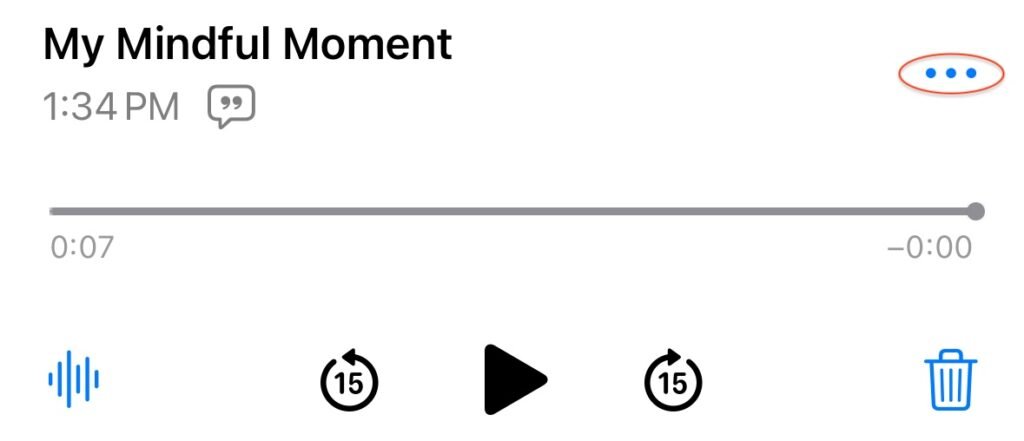
- Send the audio file to mymindfulmoment@podmasna.com or feedback@podmasana.com. For the Voice Memos app, tap the ellipses (three dots) on the recording file and then click share.
Feel free to use fancier equipment to record your submission as well.